After the Hack: a free WordPress plugin for getting hacked spam out of Google
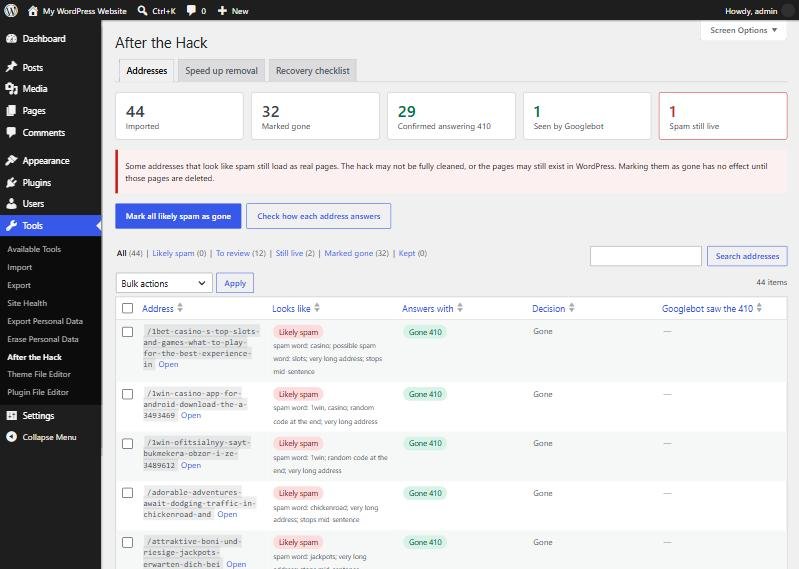
Cleaning a hacked WordPress site is only half the job. Casino and pharmacy spam can stay in Google under your domain for months after the malware has gone. After the Hack is a free plugin for that second half. It answers the spam addresses with 410 Gone, checks that every one of them really is gone, and shows you how the recovery is going.
Version 1.0.0, released 8 November 2026. Needs WordPress 6.0 or newer and PHP 7.4 or newer. Free and open source under the GPL. No account, no tracking, and no data leaves your site.
This is a new release. Take a backup before installing it, as you would with any plugin. Clean the infection first: this plugin does not remove malware.
The problem it solves
A common WordPress hack, often called a Japanese keyword hack or a casino spam hack, creates thousands of fake pages on your domain. Google crawls them and lists them under your name. You find the hole, delete the malware and change the passwords, and the site looks clean. But a search for site:yourdomain.com still shows pages about online casinos, cheap pills or betting apps.
Those results stay because Google does not know the pages have gone. It only finds out when it visits each address again. Until then, the spam keeps hurting your name. The real pages also get crawled less often, because Google spends its visits on the junk.
The fix is simple to describe: every spam address must give a clear “removed” answer, and Google must be invited back to see it. Doing that by hand for hundreds of addresses is slow and easy to get wrong. That is the part After the Hack does for you.
Why I built it
This site was hacked in 2026. After the clean-up, Google still had 265 spam addresses listed under howitwork.net. Getting them out took a small custom plugin, a list exported from Search Console and a temporary sitemap. The full guide shows how to do it by hand, with the code. After the Hack turns those steps into one screen in WordPress, so you don’t have to write any code. The plugin has been running on this site since the day it was released.
What it does
- Imports the spam list from a Search Console CSV export, or from addresses you paste in.
- Sorts it for you. Each address gets a spam score. Anything unclear waits for your review.
- Answers with 410 Gone, the clear signal that a page was removed on purpose.
- Checks every address on your live site and warns you if spam still loads, which usually means the clean-up isn’t finished.
- Publishes a temporary sitemap that invites Google back to the removed addresses.
- Shows your progress, including which addresses a crawler identifying as Googlebot has already received the 410 for.
- Handles very large hacks with wildcard rules such as
/*casino*, because Search Console exports stop at 1,000 rows.
404, 410 or a redirect: which answer is right?
| Answer | What it tells Google | Use it for spam? |
|---|---|---|
| 410 Gone | The page was removed on purpose and is not coming back. | Yes. The clearest signal. |
| 404 Not Found | There is nothing here, for now. | Works too, but is a weaker signal. |
| 301 to the home page | The content moved. Google often treats it as a “soft 404” and may keep checking. | No. It can also tie the spam to your home page. |
| Blocked in robots.txt | Do not visit. Google can then never see that the page is gone, so the listing can stay. | No. |
| 200 with your normal page | The page exists. | No. This is what a half-cleaned site often does. |
How it decides what looks like spam
When you import a list, each address gets a score from simple, visible rules. The score only decides how the list is sorted and what “mark all likely spam” selects. It never removes anything by itself. An address scoring 3 or more counts as likely spam.
| Signal | Example | Points |
|---|---|---|
| Strong spam word: casino, betting brands, viagra and similar | /best-online-casino-bonus/ |
3 |
| Weaker words, such as bonus, slots, loans, replica | /cheap-replica-handbags/ |
1 each, up to 2 |
| Japanese, Chinese or Cyrillic letters in the path | /激安-バッグ/ |
2 |
| A random number or code at the end | /spin-win-today-guide-482915/ |
2 or 3 |
| A very long address (7 words or more) | /how-to-play-and-win-real-money-games/ |
1 |
| A long address cut off mid-sentence, as generators do | /the-best-way-to-win-money-online-in-the/ |
+2 |
| Ends in .html or .php | /news/bet-tips.php |
1 |
The word lists cover English and common European spellings, such as kasino, kazino, apuestas and sportwetten, because these hacks are often aimed at other countries.
It can’t remove a real page
The plugin only sends a 410 when WordPress has nothing to show at that address: a “not found” page or an empty archive. If a real post or page ends up on the list by mistake, it keeps loading normally. The one exception is spam that uses a query string on your home or search page, such as /?casino=win. That only ever matches the exact addresses you marked, so your home page itself is never affected.
Wildcard rules have their own guard rails. Each rule needs at least four ordinary characters besides the * and /, can use at most five wildcards, and you can save up to 100 rules. A rule such as /*, which would catch every missing page, is rejected. Like the list, rules only apply where WordPress has nothing to show.
How to use it
- In WordPress, open Plugins > Add New > Upload Plugin, choose the ZIP and activate it.
- Go to Tools > After the Hack and read the Recovery checklist tab.
- In Search Console, open Indexing > Pages. Open the reasons that list spam, such as “Crawled – currently not indexed”, or the indexed pages, and export the list as CSV. Unzip it and upload
Table.csv. You can import several exports; duplicates are skipped. - Review the list. Mark the spam as gone, one by one or with “mark all likely spam”.
- Run the status check. It requests each address on your own site and records the answer.
- Under Speed up removal, publish the temporary sitemap and submit its address under Indexing > Sitemaps in Search Console.
- Optional: for addresses you need gone quickly, also use the Removals tool in Search Console. That hides them for about six months while the 410s do the permanent work.
- Keep the plugin active until the Pages report no longer shows the spam as indexed, then remove the sitemap from Search Console.
Reading the status check
- 410: done. The address is answered as gone.
- 200: spam still loads. Either the hack is still active (a backdoor, a rogue plugin or a database entry is creating the page), or the address is a real page. Look at it in a private browser window before doing anything else.
- 301 or 302: something redirects the address before WordPress can answer. Common causes are a redirect plugin set to send all missing pages to the home page, rules in
.htaccess, or the hack itself. Turn off “redirect 404s” while the clean-up runs. - 403 or no answer: a firewall, security plugin or CDN blocked the check. Your site may be fine, but make sure the same block doesn’t stop Googlebot.
What happened on this site
These numbers are from the Search Console Pages report for howitwork.net. They cover the whole clean-up, not only the plugin: the 410 answers and the temporary sitemap were in place from 1 November 2026, and the plugin took over on 8 November.
- 1 November: 275 pages indexed, of which only about 14 were real. 265 spam addresses were imported and all of them answered 410.
- 6 November: 181 pages indexed.
- 9 November: 162 pages indexed. The number of real pages indexed went up over the same period, as Google spent fewer visits on spam.
So roughly 110 spam listings dropped out in the first eight days, and the rest are still in progress. Your speed will differ: it depends on how often Google crawls your site.
What to expect
Google drops a page only after it visits again and receives the 410. That often takes weeks and can take months, and no plugin can promise a date. The temporary sitemap is a practical way to prompt those visits, but it is not an official Google recommendation. In the Pages report, you will see the spam move from indexed to “Not found (404)” or similar reasons. That is the result you want.
After the Hack or do it by hand?
| After the Hack | By hand | |
|---|---|---|
| Import from Search Console | Upload the CSV | Copy into code or .htaccess |
| Spot real pages on the list | Automatic: real pages keep loading | Up to you |
| Check every address | Built in | A script or one by one |
| Temporary sitemap | One tick box | Write and host the XML yourself |
| Track Googlebot visits | Built in | Read server logs |
| Best for | Most site owners | Developers who want full control: see the manual guide |
Common questions
Should I block the spam in robots.txt?
No. Google has to visit an address to receive the 410. A robots.txt block keeps the old listing in place.
Does it work with caching plugins and CDNs?
Yes. The 410 page is sent with no-cache headers. If a cache stored a spam page while the hack was active, purge the cache once, then run the status check again.
Will it slow my site down?
No. It only looks up its list when WordPress has already found nothing to show, or when the home or search page is opened with extra query text. Normal page views are not affected.
What happens when I deactivate it?
The addresses go back to your normal 404 answer. Deleting the plugin also removes its list and settings.
How accurate is “Seen by Googlebot”?
It records requests whose user agent says Googlebot, without verifying the visitor’s address. Treat it as a progress indicator. The Pages report in Search Console is the final word.
What do visitors see?
A short, plain page that says “This page no longer exists. It has been permanently removed,” with a link to your home page. It is marked noindex. Developers can change it with the after_the_hack_gone_html filter.
Is it on WordPress.org?
Not yet. Until it is listed there, download it from this page. The download link will stay the same.
Still infected, or short of time?
If the spam keeps coming back, the hack isn’t fully cleaned: something on the server is still creating pages. See the IT services and prices if you would like help finding it. A WordPress rescue is a fixed-price job.